Corbel reads first, then you measure
Upload your PDF drawings, CAD exports or scans, and Corbel reads the scale. Then it reads the printed room areas, the door and window schedules and the spec notes. On a CAD vector PDF it also traces walls drawn in red masonry.
You review the readings and accept or reject each one. You can undo or restore a rejected reading. The tutorial on reviewing the readings shows how this looks on a real house plan.
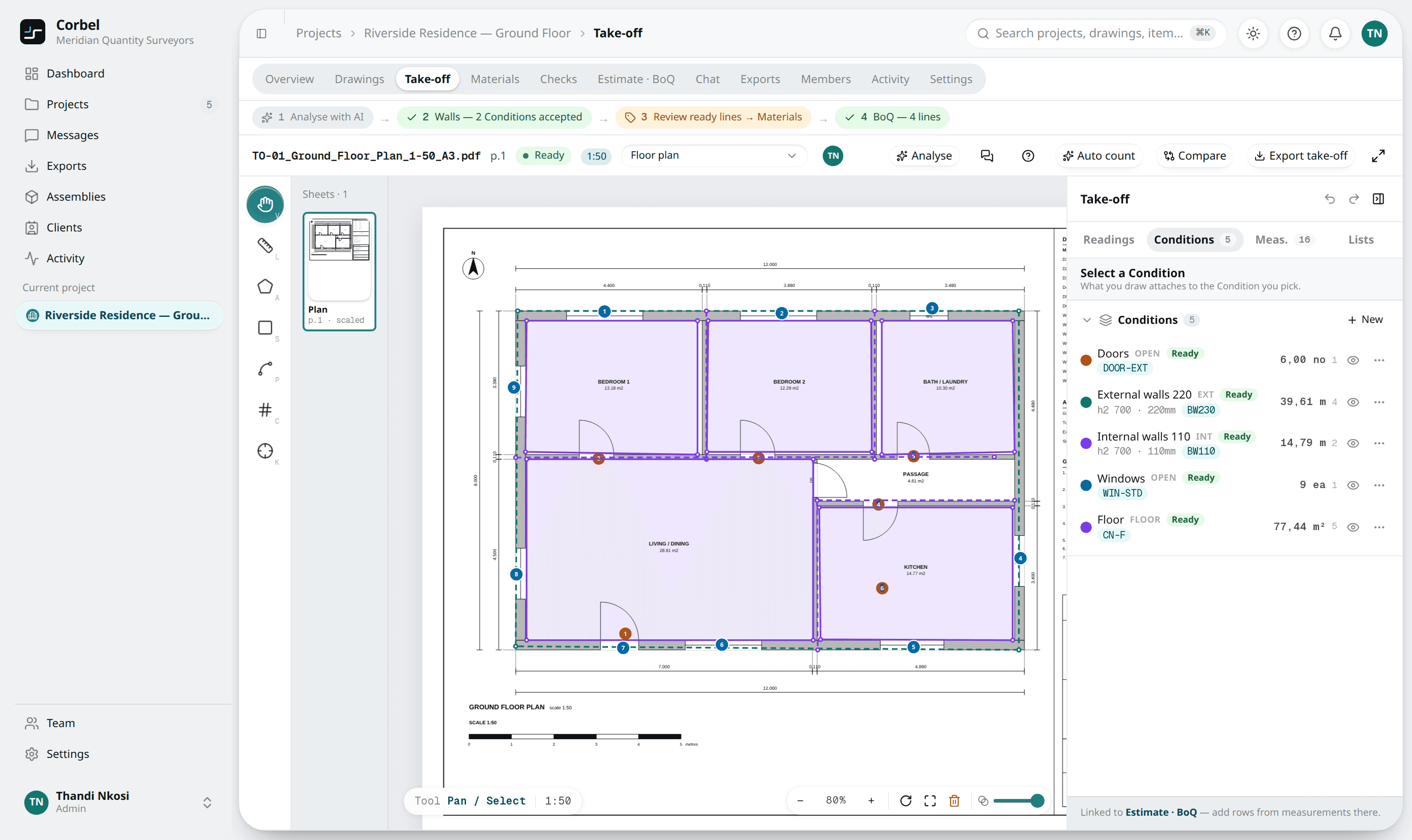
Measure what the drawing does not print
You measure lengths, areas and counts straight on the PDF. Areas use the rectangle tool and items use Count. Each measurement sits on a named condition with a default rate, so identical items collect themselves.
The guide how to do a take-off from a PDF drawing walks through the whole flow, step by step.
Accepted readings feed the bill lines
An accepted room area feeds the floor and ceiling lines. A schedule feeds lintels and sills.
Every bill line traces back to where it was measured. If you revise the drawing, revision compare overlays the new revision on the old one and shows what moved.
Scans and CAD exports
Corbel works on scans too. On a scan it still reads the printed room areas, the door and window schedule and the scale. Plan walls are traced only from a CAD vector PDF with the masonry drawn in red, so on a scan you draw the walls yourself. Either way, you confirm every reading.
That limit is deliberate. Corbel shows you what the drawing states and leaves the rest to your judgement.
The Assistant and your rates
The Corbel Assistant is a chat built into the tool. It explains what was read, cleans up wrong or duplicate readings and drafts the bill. Every change is a card you apply, and you can undo an applied card while the items it changed are untouched.
Lines pick up the rates in your library when you review them on Materials. Nothing in your bill changes until you accept it.
From quantities to a priced bill
The quantities flow into a priced ASAQS bill of quantities in rands. Read more on the bill of quantities software page, or watch the short tutorials.
Price and free trial
Plans start at R690 a month, excl. VAT, in rands. Every plan has the full take-off, the bill and the Corbel Assistant. You start with a 1-month free trial, no card needed. The trial includes 1 project and 3 AI reads. See the plans and prices or read the questions we get asked most.